In the ASC26 Preliminary Round, teams are encouraged to give their very best as they tackle the assigned challenges and submit a comprehensive proposal. Your submission should clearly present your cluster design, source code optimization strategies, and output results, demonstrating both technical rigor and creative problem-solving. All proposals, submitted in English, will be carefully and rigorously reviewed by the ASC26 Evaluation Committee, ensuring a fair, transparent, and thorough assessment of every team's work.
Important Deadline:All participating teams must submit the required materials by 24:00 on March 4, 2026 (UTC/GMT +8:00).
Proposal Submission: Each team is required to submit a proposal that includes a clear and properly structured table of contents. The proposal file must be named using the following format: [University/College Name]_[Contact Person Name] (e.g., ABC_University_John_Doe). The complete proposal must be compiled into one single PDF file and upload the official submission platform.
Additional Materials: All supplementary materials must be compressed into a single file and named using the following convention: [University/College Name]_[Contact Person Name]. The compressed file must contain no fewer than four folders, structured as specified in Appendix A. The compressed file must be uploaded to the designated FTP server. Access details, including the FTP address, will be provided to teams via email at a later date.
· Output files of HPL
· Output files of HPCG
· Required files of Embodied World Model
· Required files of AMSS-NCKU
Submission Confirmation and Support: All required materials must be completed and submitted by the specified deadline and in full compliance with the submission guidelines. Submissions that are incomplete, improperly formatted, or submitted after the deadline will not be evaluated and will receive no score. A confirmation email will be sent shortly after all required materials have been successfully received.
Answer: The preliminary round notification contains all the information you need. Please review it carefully.
Answer: The testing platform is currently being prepared. The login information will be sent to all participants via email at a later time.
Answer: The allowance for modifying parallelization parameters is intended as a broad permission, enabling teams to optimize runtime performance within the prescribed framework.
The GPU version has not been maintained for a long time and may contain unknown bugs. Therefore, teams opting to use the GPU version do so at their own discretion. Please note that any issues arising from the use of the GPU version will need to be resolved independently by the participating teams.
As noted, if optimization is performed, the new algorithm must be mathematically and physically equivalent to the original one. We encourage all teams to take these factors into careful consideration when configuring their systems and adjusting the code.
Answer: We advise against modifying the configuration. During inference, retain the original data_dir path (examples/world_model_interaction_prompts)from the official YAML example, which includes 5 scenarios weighted at 0.2 each. This serves solely for code verification and does not impact model inference. The actual inference scenario is defined in run_world_model_interaction.sh. Individually modifying 20 YAML files for 20 cases may impose substantial operational challenges.
Answer: Consider trying this:https://hf-mirror.com/unitreerobotics/UnifoLM-WMA-0-Dual
Answer: The PSNR accuracy in the baseline should normally be inf (infinity). We recommend that: Check whether the model was downloaded correctly, Verify if the executed shell script has been modified, Compare whether the generated video and the ground truth (GT) have the same duration, Confirm whether the one-to-one PSNR calculation script was executed properly.
Answer: The sponsor-provided remote login platform for the preliminary stage, equipped with AMD W7900D GPUs, is now available. The login instructions and user manual have been sent to the registered email address of the supervisor and team leader.
Answer: If you encounter any issues using the platform, please contact the sponsor via email: zhengwei.lou@newpower-ai.com.
Answer: Recently, some teams have not followed the official documentation, producing various weird and unexpected results. We hope participants will carefully read the competition handbook. Here we are also providing a set of execution steps for reference. We have tested unitree_g1_pack_camera/case1 under various test environment settings.
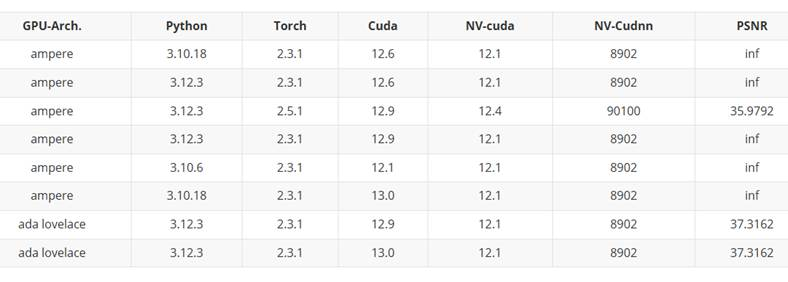
Our testing process is provided below for your reference(Whether conda is used or not, the test results are consistently similar):
1、conda create -n unifolm-wma python==3.10.18
conda activate unifolm-wma
conda install pinocchio=3.2.0 -c conda-forge -y
conda install ffmpeg=7.1.1 -c conda-forge
git clone --recurse-submodules https://github.com/unitreerobotics/unifolm-world-model-action.git
cd unifolm-world-model-action
git submodule update --init --recursive
pip install -e .
cd external/dlimp
pip install -e .
2、modify configs/inference/world_model_interaction.yaml
data_dir: 'examples/world_model_interaction_prompts'
3、sh unitree_g1_pack_camera/case1/run_world_model_interaction.sh
python psnr_score_for_challenge.py --gt_video
unitree_g1_pack_camera/case1/unitree_g1_pack_camera_case1.mp4
--pred_video unitree_g1_pack_camera/case1/output/inference/0_full_fs6.mp4
--output_file unitree_g1_pack_camera/case1/psnr_result.json
Answer: Perhaps you can check the variable ‘torch.backends.cuda.matmul.allow_tf32’, and test both setting.
Answer: In light of computational non-determinism discrepancies between AMD and NVIDIA platforms leading to low evaluation accuracy, the organizing committee has approved the following protocol for AMD users:
1. Baseline Inference: Run inference using the original deployment code to generate reference results (as Ground Truth).
2. Optimization Phase: Optimize the code, and submit both original and optimized code for verification. The optimized solution must achieve PSNR > 25 against the AMD-generated GT.
Answer: The FTP server for submitting preliminary contest results is now available.
IP address: 47.243.142.168
Port: 2121
The login instructions and user manual have been sent to the registered email address of the supervisor and team leader.
Answer: - Method 1 treats position as a 3D vector and measures the geometric distance
- Method 2 treats each coordinate independently.
Answer:Please adopt the mothod 2
Answer: NO,the z-coordinate is not required
Answer:To reduce the amount of data uploaded, please exclude the highlighted folders from your submission. However, be sure to retain the full data locally on your platform for inspection purposes.
GW150914
├── AMSS_NCKU_output
│ └── binary_output
├── AMSS_NCKU_source_copy
└── figure
├── contour plot
├── density plot
└── surface plot
For any further inquiries, please contact the ASC committee via:
Technical Support :
techsupport@asc-events.org
|General Information : info@asc-events.org|Press : media@asc-events.org